TimeSeries#
- class gwpy.timeseries.TimeSeries(
- data: ArrayLike1D,
- unit: UnitLike = None,
- t0: SupportsToGps | None = None,
- dt: float | Quantity | None = None,
- sample_rate: float | Quantity | None = None,
- times: ArrayLike1D | None = None,
- channel: Channel | str | None = None,
- name: str | None = None,
- **kwargs,
Bases:
TimeSeriesBaseA time-domain data array.
- Parameters:
- valuearray_like
Input data array.
- unit
Unit, optional Physical unit of these data.
- t0
LIGOTimeGPS,float,str, optional GPS epoch associated with these data, any input parsable by
to_gpsis fine.- dt
float,Quantity, optional Time between successive samples (seconds), can also be given inversely via
sample_rate.- sample_rate
float,Quantity, optional The rate of samples per second (Hertz), can also be given inversely via
dt.- times
array-like The complete array of GPS times accompanying the data for this series. This argument takes precedence over
t0anddtso should be given in place of these if relevant, not alongside.- name
str, optional Descriptive title for this array.
- channel
Channel,str, optional Source data stream for these data.
- dtype
dtype, optional Input data type.
- copy
bool, optional Choose to copy the input data to new memory.
- subok
bool, optional Allow passing of sub-classes by the array generator.
Notes
The necessary metadata to reconstruct timing information are recorded in the
epochandsample_rateattributes. This time-stamps can be returned via thetimesproperty.All comparison operations performed on a
TimeSerieswill return aStateTimeSeries- a boolean array with metadata copied from the startingTimeSeries.Examples
>>> from gwpy.timeseries import TimeSeries
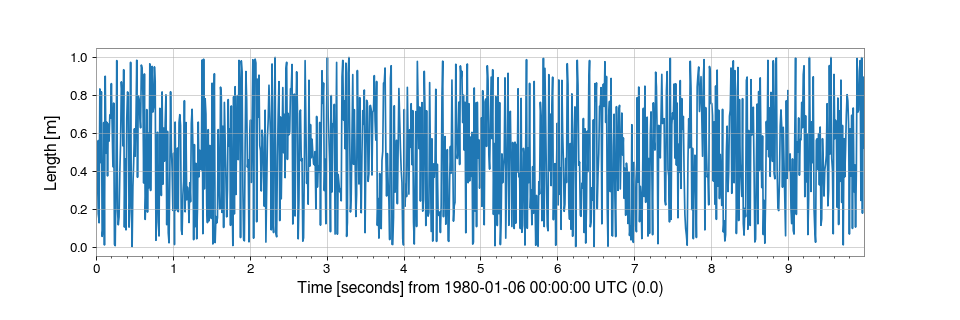
To create an array of random numbers, sampled at 100 Hz, in units of ‘metres’:
>>> from numpy import random
>>> series = TimeSeries(random.random(1000), sample_rate=100, unit='m')
which can then be simply visualised via
>>> plot = series.plot()
>>> plot.show()
(
png)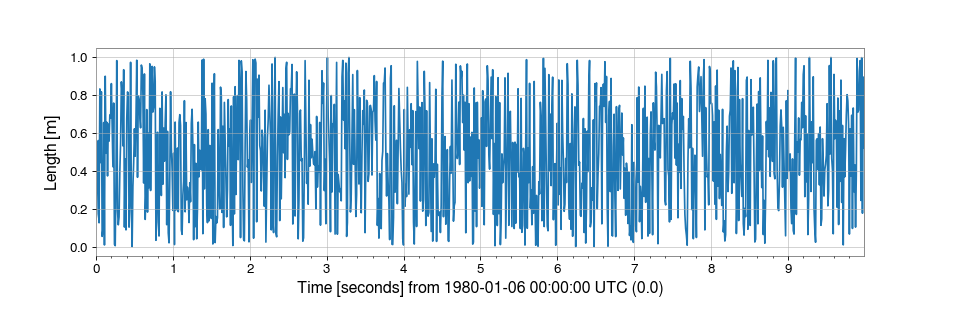
Attributes Summary
Retrieve data for a channel from any data source.
Read data into a
TimeSeries.Write this
TimeSeriesto a file.Methods Summary
asd([fftlength, overlap, window, method])Calculate the ASD
FrequencySeriesof thisTimeSeries.auto_coherence(dt[, fftlength, overlap, window])Calculate the coherence between this series and a shifted copy of itself.
average_fft([fftlength, overlap, window])Compute the averaged one-dimensional DFT of this
TimeSeries.bandpass(flow, fhigh[, gpass, gstop, fstop, ...])Filter this
TimeSerieswith a band-pass filter.coherence(other[, fftlength, overlap, window])Calculate the frequency-coherence between this
TimeSeriesand another.coherence_spectrogram(other, stride[, ...])Calculate the coherence spectrogram between this
TimeSeriesand other.convolve(fir[, window])Convolve this
TimeSerieswith an FIR filter using the overlap-save method.correlate(mfilter[, window, detrend, ...])Cross-correlate this
TimeSerieswith another signal.csd(other[, fftlength, overlap, window])Calculate the CSD
FrequencySeriesfor twoTimeSeries.csd_spectrogram(other, stride[, fftlength, ...])Calculate the cross spectral density spectrogram with
other.demodulate(...)Compute the average magnitude and phase of this
TimeSeries.detrend([detrend])Remove the trend from this
TimeSeries.fft([nfft])Compute the one-dimensional discrete Fourier transform of this
TimeSeries.fftgram(fftlength[, overlap, window])Calculate the Fourier-gram of this
TimeSeries.filter(filt, *[, analog, unit, ...])Filter this
TimeSerieswith an IIR or FIR filter.find_gates([tzero, whiten, threshold, ...])Identify points that should be gates using a provided threshold.
gate([tzero, tpad, whiten, threshold, ...])Remove high amplitude peaks from data using inverse Tukey window.
heterodyne(phase[, stride, singlesided])Compute the heterodyned average magnitude and phase of this
TimeSeries.highpass(frequency[, gpass, gstop, fstop, ...])Filter this
TimeSerieswith a high-pass filter.lowpass(frequency[, gpass, gstop, fstop, ...])Filter this
TimeSerieswith a Butterworth low-pass filter.mask([deadtime, flag, query_open_data, ...])Mask portions of this
TimeSeriesthat fall within a given list of segments.notch(frequency[, type, filtfilt])Notch out a frequency in this
TimeSeries.psd([fftlength, overlap, window, method])Calculate the PSD
FrequencySeriesfor thisTimeSeries.q_gram([qrange, frange, mismatch, snrthresh])Scan a
TimeSeriesusing the multi-Q transform.q_transform([qrange, frange, gps, search, ...])Compute the multi-Q transform and return an interpolated spectrogram.
rayleigh_spectrogram(stride[, fftlength, ...])Calculate the Rayleigh statistic spectrogram of this
TimeSeries.rayleigh_spectrum([fftlength, overlap, window])Calculate the Rayleigh
FrequencySeriesfor thisTimeSeries.resample(rate[, window, ftype, n])Resample this Series to a new rate.
rms([stride])Calculate the root-mean-square value of this
TimeSeriesonce per stride.spectral_variance(stride[, fftlength, ...])Calculate the
SpectralVarianceof thisTimeSeries.spectrogram(stride[, fftlength, overlap, ...])Calculate the average power spectrogram of this
TimeSeries.spectrogram2(fftlength[, overlap, window])Calculate the non-averaged power
Spectrogramof thisTimeSeries.taper([side, duration, nsamples])Taper the ends of this
TimeSeriessmoothly to zero.transfer_function(other[, fftlength, ...])Calculate the transfer function between this
TimeSeriesand another.whiten([fftlength, overlap, method, window, ...])Whiten this
TimeSeriesusing inverse spectrum truncation.zpk(zeros, poles, gain, *[, analog, unit, ...])Filter this
TimeSeriesby applying a digital zero-pole-gain filter.Attributes Documentation
- get#
Retrieve data for a channel from any data source.
This method attempts to get data any way it can, potentially iterating over multiple available data sources.
- Parameters:
- channels
list Required data channels.
- start
LIGOTimeGPS,float,str GPS start time of required data, any input parseable by
to_gpsis fine- end
LIGOTimeGPS,float,str GPS end time of required data, any input parseable by
to_gpsis fine- source
str,list,listofdict. The data source to use. One of the following formats:
str- the name of a single source to use,list- a list of source names to try in order,listofdict- a list of source specifications to try in order; eachdictmust contain a"source"key giving the name of the source to use, and may contain other keys giving options to pass to the data access function for that source.
See ‘Notes’ section below for valid source names.
- frametype
str Name of frametype in which this channel is stored, by default will search for all required frame types.
- pad
float Value with which to fill gaps in the source data, by default gaps will result in a
ValueError.- scaled
bool apply slope and bias calibration to ADC data, for non-ADC data this option has no effect.
- nproc
int, default:1 Number of parallel processes to use, serial process by default.
- allow_tape
bool, default:None Allow the use of data files that are held on tape. Default is
Noneto attempt to allow theTimeSeries.fetchmethod to intelligently select a server that doesn’t use tapes for data storage (doesn’t always work), but to eventually allow retrieving data from tape if required.- verbose
bool This argument is deprecated and will be removed in a future release. Use DEBUG-level logging instead, see Logging with GWpy.
- kwargs
Other keyword arguments to pass to the data access function for each data source.
- channels
- read#
Read data into a
TimeSeries.Arguments and keywords depend on the output format, see the online documentation for full details for each format, the parameters below are common to all formats.
- Parameters:
- source
str,os.PathLike,file, orlistofthese Source of data, any of the following:
Path of a single data file
List of data file paths
Path of LAL-format cache file
- name
str, optional The name of the data object to read, or a
Channelobject. This argument is required ifsourcecontains (or may contain) multiple datasets.When reading from GWF, this argument should specify the name of the channel to read.
When reading from HDF5, this argument should specify the path or dataset name within the file.
- start
LIGOTimeGPS,float,str, optional GPS start time of required data, defaults to start of data found; any input parseable by
to_gpsis fine.- end
LIGOTimeGPS,float,str, optional GPS end time of required data, defaults to end of data found; any input parseable by
to_gpsis fine.- format
str, optional Source format identifier. If not given, the format will be detected if possible. See below for list of acceptable formats.
- parallel
int, optional Number of parallel processes to use, serial process by default.
- pad
float, optional Value with which to fill gaps in the source data, by default gaps will result in a
ValueError.
- source
- Raises:
IndexErrorif
sourceis an empty list
- write#
Write this
TimeSeriesto a file.Arguments and keywords depend on the output format, see the online documentation for full details for each format, the parameters below are common to most formats.
Methods Documentation
- asd(
- fftlength: float | None = None,
- overlap: float | None = None,
- window: WindowLike = 'hann',
- method: str = 'median',
- **kwargs,
Calculate the ASD
FrequencySeriesof thisTimeSeries.- Parameters:
- fftlength
float Number of seconds in single FFT, defaults to a single FFT covering the full duration.
- overlap
float, optional Number of seconds of overlap between FFTs, defaults to the recommended overlap for the given window (if given), or 0.
- window
str,numpy.ndarray, optional Window function to apply to timeseries prior to FFT, see
scipy.signal.get_window()for details on acceptable formats.- method
str, optional FFT-averaging method (default:
'median'), see Notes for more details- kwargs
Other keyword arguments are passed to the underlying ASD-generation method.
- fftlength
- Returns:
- asd
FrequencySeries A data series containing the ASD.
- asd
See also
Notes
The accepted
methodarguments are:'bartlett': a mean average of non-overlapping periodograms'median': a median average of overlapping periodograms'welch': a mean average of overlapping periodograms
- auto_coherence(
- dt: float,
- fftlength: float | None = None,
- overlap: float | None = None,
- window: WindowLike = 'hann',
- **kwargs,
Calculate the coherence between this series and a shifted copy of itself.
The standard
TimeSeries.coherence()is calculated between the inputTimeSeriesand acroppedcopy of itself. Since the cropped version will be shorter, the input series will be shortened to match.- Parameters:
- dt
float Duration (in seconds) of time-shift.
- fftlength
float, optional Number of seconds in single FFT, defaults to a single FFT covering the full duration.
- overlap
float, optional Number of seconds of overlap between FFTs, defaults to the recommended overlap for the given window (if given), or 0.
- window
str,numpy.ndarray, optional Window function to apply to timeseries prior to FFT, see
scipy.signal.get_window()for details on acceptable formats.- kwargs
Any other keyword arguments accepted by
matplotlib.mlab.cohere()exceptNFFT,window, andnoverlapwhich are superceded by the above keyword arguments.
- dt
- Returns:
- coherence
FrequencySeries The coherence
FrequencySeriesof thisTimeSerieswith the other.
- coherence
See also
matplotlib.mlab.cohereFor details of the coherence calculator.
Notes
The
TimeSeries.auto_coherence()will perform best whendtis approximatelyfftlength / 2.
- average_fft(
- fftlength: float | Quantity | None = None,
- overlap: float | Quantity = 0,
- window: WindowLike | None = None,
Compute the averaged one-dimensional DFT of this
TimeSeries.This method computes a number of FFTs of duration
fftlengthandoverlap(both given in seconds), and returns the mean average. This method is analogous to the Welch average method for power spectra.- Parameters:
- fftlength
float Number of seconds in single FFT; by default uses whole
TimeSeries.- overlap
float, optional Number of seconds of overlap between FFTs, defaults to the recommended overlap for the given window (if given), or 0.
- window
str,numpy.ndarray, optional Window function to apply to timeseries prior to FFT, see
scipy.signal.get_window()for details on acceptable formats.
- fftlength
- Returns:
- outcomplex-valued
FrequencySeries The transformed output, with populated frequencies array metadata.
- outcomplex-valued
See also
TimeSeries.fftThe FFT method used.
- bandpass(
- flow: float,
- fhigh: float,
- gpass: float = 2,
- gstop: float = 30,
- fstop: tuple[float, float] | None = None,
- type: Literal['fir', 'iir'] = 'iir',
- *,
- filtfilt: bool = True,
- **kwargs,
Filter this
TimeSerieswith a band-pass filter.- Parameters:
- flow
float Lower corner frequency of pass band.
- fhigh
float Upper corner frequency of pass band.
- gpass
float The maximum loss in the passband (dB).
- gstop
float The minimum attenuation in the stopband (dB).
- fstop
tupleoffloat, optional (low, high)edge-frequencies of stop band.- type
str The filter type, either
'iir'or'fir'.- filtfilt
bool, optional If
True, apply the filter using a forward-backward filter design, otherwise apply the filter in a single pass. Defaults toTrue.- kwargs
Other keyword arguments are passed to
gwpy.signal.filter_design.bandpass()
- flow
- Returns:
- bpseries
TimeSeries A band-passed version of the input
TimeSeries.
- bpseries
See also
gwpy.signal.filter_design.bandpassFor details on the filter design.
TimeSeries.filterFor details on how the filter is applied.
- coherence(
- other: TimeSeries,
- fftlength: float | None = None,
- overlap: float | None = None,
- window: WindowLike = 'hann',
- **kwargs,
Calculate the frequency-coherence between this
TimeSeriesand another.- Parameters:
- other
TimeSeries TimeSeriessignal to calculate coherence with- fftlength
float, optional Number of seconds in single FFT, defaults to a single FFT covering the full duration.
- overlap
float, optional Number of seconds of overlap between FFTs, defaults to the recommended overlap for the given window (if given), or 0.
- window
str,numpy.ndarray, optional Window function to apply to timeseries prior to FFT, see
scipy.signal.get_window()for details on acceptable formats.- kwargs
Any other keyword arguments accepted by
matplotlib.mlab.cohere()exceptNFFT,window, andnoverlapwhich are superceded by the above keyword arguments.
- other
- Returns:
- coherence
FrequencySeries The coherence
FrequencySeriesof thisTimeSerieswith the other.
- coherence
See also
scipy.signal.coherenceFor details of the coherence calculator.
Notes
If
selfandotherhave differenceTimeSeries.sample_ratevalues, the higher sampledTimeSerieswill be down-sampled to match the lower.
- coherence_spectrogram(
- other: TimeSeries,
- stride: float,
- fftlength: float | None = None,
- overlap: float | None = None,
- window: WindowLike = 'hann',
- nproc: int = 1,
Calculate the coherence spectrogram between this
TimeSeriesand other.- Parameters:
- other
TimeSeries The second
TimeSeriesin this CSD calculation.- stride
float Number of seconds in single PSD (column of spectrogram).
- fftlength
float Number of seconds in single FFT.
- overlap
float, optional Number of seconds of overlap between FFTs, defaults to the recommended overlap for the given window (if given), or 0.
- window
str,numpy.ndarray, optional Window function to apply to timeseries prior to FFT, see
scipy.signal.get_window()for details on acceptable formats.- nproc
int Number of parallel processes to use when calculating individual coherence spectra.
- other
- Returns:
- spectrogram
Spectrogram Time-frequency coherence spectrogram as generated from the input time-series.
- spectrogram
- convolve(fir: numpy.ndarray, window: WindowLike = 'hann') Self[source]#
Convolve this
TimeSerieswith an FIR filter using the overlap-save method.- Parameters:
- fir
numpy.ndarray The time domain filter to convolve with.
- window
str, optional Window function to apply to boundaries, default:
'hann'seescipy.signal.get_window()for details on acceptable formats.
- fir
- Returns:
- out
TimeSeries The result of the convolution.
- out
See also
scipy.signal.fftconvolveFor details on the convolution scheme used here.
TimeSeries.filterFor an alternative method designed for short filters.
Notes
The output
TimeSeriesis the same length and has the same timestamps as the input.Due to filter settle-in, a segment half the length of
firwill be corrupted at the left and right boundaries. To prevent spectral leakage these segments will be windowed before convolving.
- correlate(
- mfilter: TimeSeries,
- window: WindowLike = 'hann',
- detrend: Literal['linear', 'constant'] = 'linear',
- *,
- whiten: bool = False,
- wduration: float = 2,
- highpass: float | None = None,
- **asd_kw,
Cross-correlate this
TimeSerieswith another signal.- Parameters:
- mfilter
TimeSeries the time domain signal to correlate with
- window
str, optional window function to apply to timeseries prior to FFT, default:
'hann'seescipy.signal.get_window()for details on acceptable formats- detrend
str, optional type of detrending to do before FFT (see
detrendfor more details), default:'linear'- whiten
bool, optional boolean switch to enable (
True) or disable (False) data whitening, default:False- wduration
float, optional duration (in seconds) of the time-domain FIR whitening filter, only used if
whiten=True, defaults to 2 seconds- highpass
float, optional highpass corner frequency (in Hz) of the FIR whitening filter, only used if
whiten=True, default:None- **asd_kw
keyword arguments to pass to
TimeSeries.asdto generate an ASD, only used ifwhiten=True
- mfilter
- Returns:
- snr
TimeSeries the correlated signal-to-noise ratio (SNR) timeseries
- snr
See also
TimeSeries.asdfor details on the ASD calculation
TimeSeries.convolvefor details on convolution with the overlap-save method
Notes
The
windowargument is used in ASD estimation, whitening, and preventing spectral leakage in the output. It is not used to condition the matched-filter, which should be windowed before passing to this method.Due to filter settle-in, a segment half the length of
mfilterwill be corrupted at the beginning and end of the output. Seeconvolvefor more details.The input and matched-filter will be detrended, and the output will be normalised so that the SNR measures number of standard deviations from the expected mean.
- csd(
- other: TimeSeries,
- fftlength: float | None = None,
- overlap: float | None = None,
- window: WindowLike = 'hann',
- **kwargs,
Calculate the CSD
FrequencySeriesfor twoTimeSeries.- Parameters:
- other
TimeSeries The second
TimeSeriesin this CSD calculation.- fftlength
float Number of seconds in single FFT, defaults to a single FFT covering the full duration.
- overlap
float, optional Number of seconds of overlap between FFTs, defaults to the recommended overlap for the given window (if given), or 0.
- window
str,numpy.ndarray, optional Window function to apply to timeseries prior to FFT, see
scipy.signal.get_window()for details on acceptable formats.- kwargs
Other keyword arguments are passed to the underlying CSD-generation method.
- other
- Returns:
- csd
FrequencySeries A data series containing the CSD.
- csd
- csd_spectrogram(
- other: TimeSeries,
- stride: float,
- fftlength: float | None = None,
- overlap: float = 0,
- window: WindowLike = 'hann',
- nproc: int = 1,
- **kwargs,
Calculate the cross spectral density spectrogram with
other.- Parameters:
- other
TimeSeries Second time-series for cross spectral density calculation.
- stride
float Number of seconds in single PSD (column of spectrogram).
- fftlength
float Number of seconds in single FFT.
- overlap
float, optional Number of seconds of overlap between FFTs, defaults to the recommended overlap for the given window (if given), or 0.
- window
str,numpy.ndarray, optional Window function to apply to timeseries prior to FFT, see
scipy.signal.get_window()for details on acceptable formats.- nproc
int Maximum number of independent frame reading processes, default is set to single-process file reading.
- kwargs
Other keyword arguments are passed to the underlying CSD-generation method.
- other
- Returns:
- spectrogram
Spectrogram Time-frequency cross spectrogram as generated from the two input time-series.
- spectrogram
- demodulate( ) tuple[TimeSeries, TimeSeries][source]#
- demodulate( ) TimeSeries
Compute the average magnitude and phase of this
TimeSeries.- Parameters:
- f
float Frequency (Hz) at which to demodulate the signal.
- stride
float, optional Stride (seconds) between calculations.
- exp
bool, optional Return the magnitude and phase trends as one
TimeSeriesobject representing a complex exponential.- deg
bool, optional If
exp=False, calculates the phase in degrees.
- f
- Returns:
- mag, phase
TimeSeries If
exp=False, returns a pair ofTimeSeriesobjects representing magnitude and phase trends withdt=stride.- out
TimeSeries If
exp=True, returns a singleTimeSerieswith magnitude and phase trends represented asmag * exp(1j*phase)withdt=stride.
- mag, phase
See also
TimeSeries.heterodynefor the underlying heterodyne detection method
Examples
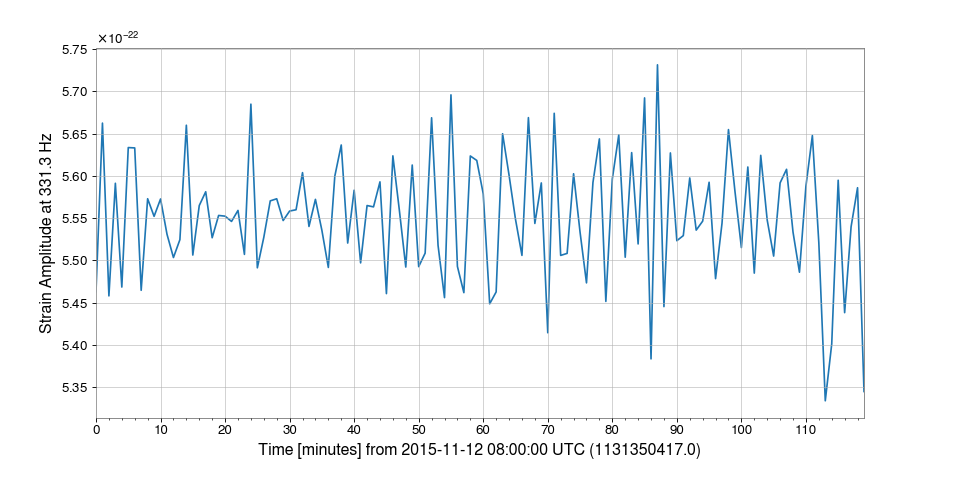
Demodulation is useful when trying to examine steady sinusoidal signals we know to be contained within data. For instance, we can download some data from GWOSC to look at trends of the amplitude and phase of LIGO Livingston’s calibration line at 331.3 Hz:
>>> from gwpy.timeseries import TimeSeries
>>> data = TimeSeries.fetch_open_data('L1', 1131350417, 1131357617)
We can demodulate the
TimeSeriesat 331.3 Hz with a stride of one minute:>>> amp, phase = data.demodulate(331.3, stride=60)
We can then plot these trends to visualize fluctuations in the amplitude of the calibration line:
>>> from gwpy.plot import Plot
>>> plot = Plot(amp)
>>> ax = plot.gca()
>>> ax.set_ylabel('Strain Amplitude at 331.3 Hz')
>>> plot.show()
(
png)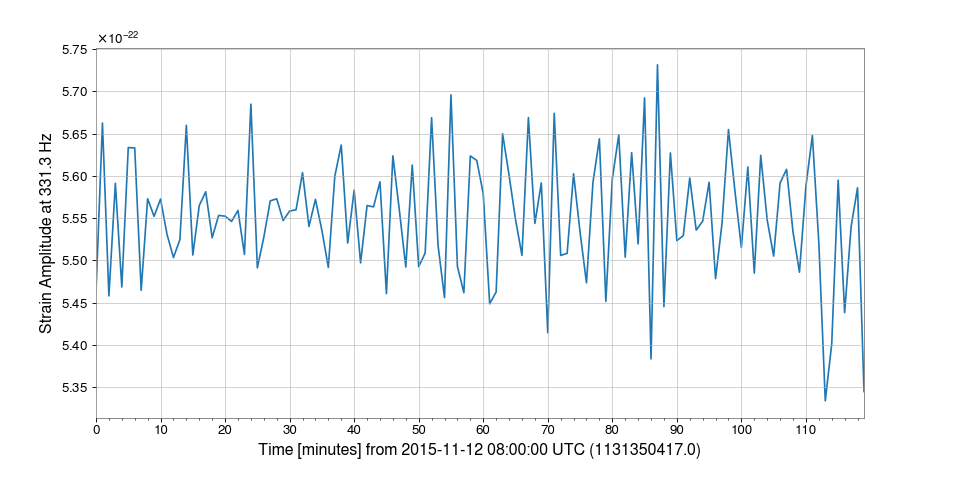
- detrend(detrend: Literal['constant', 'linear'] = 'constant') Self[source]#
Remove the trend from this
TimeSeries.This method just wraps
scipy.signal.detrend()to return an object of the same type as the input.- Parameters:
- detrend
str, optional the type of detrending.
- detrend
- Returns:
- detrended
TimeSeries the detrended input series
- detrended
See also
scipy.signal.detrendfor details on the options for the
detrendargument, and how the operation is done
- fft(nfft: int | None = None) FrequencySeries[source]#
Compute the one-dimensional discrete Fourier transform of this
TimeSeries.- Parameters:
- nfft
int, optional Length of the desired Fourier transform, input will be cropped or padded to match the desired length. If nfft is not given, the length of the
TimeSerieswill be used.
- nfft
- Returns:
- out
FrequencySeries The normalised, complex-valued FFT
FrequencySeries.
- out
See also
numpy.fft.rfftThe FFT implementation used in this method.
Notes
This method, in constrast to the
numpy.fft.rfft()method it calls, applies the necessary normalisation such that the amplitude of the outputFrequencySeriesis correct.
- fftgram( ) Spectrogram[source]#
Calculate the Fourier-gram of this
TimeSeries.At every
stride, a single, complex FFT is calculated.- Parameters:
- fftlength
float Number of seconds in single FFT.
- overlap
float, optional Number of seconds of overlap between FFTs, defaults to the recommended overlap for the given window (if given), or 0.
- window
str,numpy.ndarray, optional Window function to apply to timeseries prior to FFT, see
scipy.signal.get_window()for details on acceptable formats.- kwargs
Other keyword arguments are passed to the
scipy.signal.spectrogram()method.
- fftlength
- Returns:
- spectrogram
Spectrogram A
Spectrogramcontaining the complex-valued output of 1D FFTs at everystridein the inputTimeSeries, with each column corresponding to a single FFT.
- spectrogram
- filter(
- filt: FilterCompatible,
- *,
- analog: bool = False,
- unit: str = 'rad/s',
- normalize_gain: bool = False,
- filtfilt: bool = True,
- **kwargs,
Filter this
TimeSerieswith an IIR or FIR filter.- Parameters:
- filt
numpy.ndarrayortuple The filter to be applied. This can be specified in any of the following forms, with the appropriate number of elements in the tuple:
numpy.ndarray- 1D array of FIR filter coefficients.tuple[numpy.ndarray, numpy.ndarray]- numerator/demoinator polynomials of the transfer function.numpy.ndarray- 2D array of SOS coefficients.tuple[numpy.ndarray, numpy.ndarray, float]- zero-pole-gain representation.
- filtfilt
bool, optional Filter forward and backwards to preserve phase, default:
False.- analog
bool, optional If
True, filter coefficients will be converted from Hz to Z-domain digital representation, default:False.- inplace
bool, optional If
True, this array will be overwritten with the filtered version, default:False.- unit
str, optional For analogue ZPK filters, the units in which the zeros and poles are specified. Either
'Hz'or'rad/s'(default).- normalize_gain
bool, optional Whether to normalize the gain when converting from Hz to rad/s.
False(default): Multiply zeros/poles by -2π but leave gain unchanged. This matches the LIGO GDS ‘f’ plane convention (plane='f'ins2z()).True: Normalize gain to preserve frequency response magnitude. Gain is scaled by \(|∏p_i/∏z_i| · (2π)^{(n_p - n_z)}\). Use this when your filter was designed with the transfer function \(H(f) = k·∏(f-z_i)/∏(f-p_i)\) in Hz. This matches the LIGO GDS ‘n’ plane convention (plane='n'ins2z()).
Only used for analogue filters in Hz (
analog=True, unit="Hz").- kwargs
Other keyword arguments are passed to the filter method.
- filt
- Returns:
- result
TimeSeries The filtered version of the input
TimeSeries.
- result
- Raises:
ValueErrorIf
filtarguments cannot be interpreted properly.
See also
scipy.signal.sosfiltFor details on filtering with second-order sections.
scipy.signal.sosfiltfiltFor details on forward-backward filtering with second-order sections
scipy.signal.lfilterFor details on filtering (without SOS).
scipy.signal.filtfiltFor details on forward-backward filtering (without SOS).
Notes
IIR filters are converted into digital cascading second-order sections before being applied to the data.
FIR filters are passed directly to
scipy.signal.lfilter()orscipy.signal.filtfilt()without any conversions.Examples
We can design an arbitrarily complicated filter using
gwpy.signal.filter_design>>> from gwpy.signal import filter_design >>> bp = filter_design.bandpass(50, 250, 4096.) >>> notches = [filter_design.notch(f, 4096.) for f in (60, 120, 180)] >>> zpk = filter_design.concatenate_zpks(bp, *notches)
And then can download some data from GWOSC to apply it using
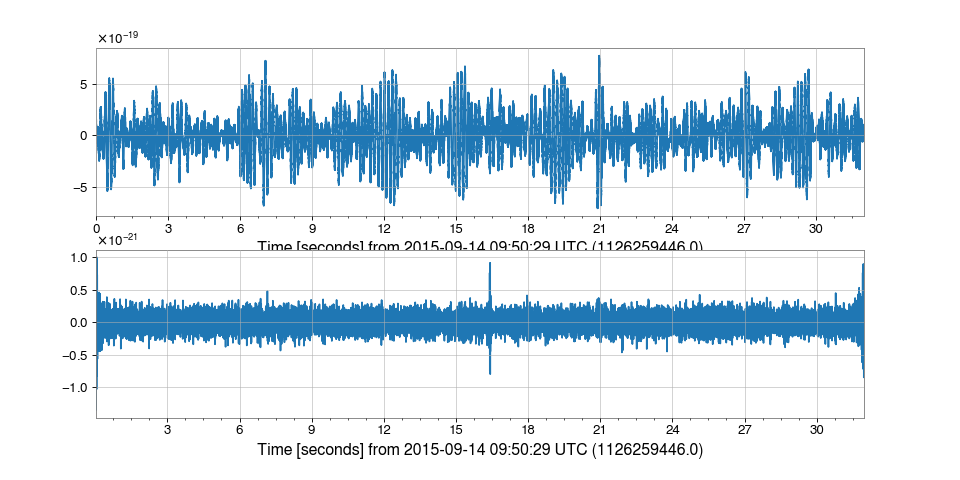
TimeSeries.filter:>>> from gwpy.timeseries import TimeSeries >>> data = TimeSeries.fetch_open_data('H1', 1126259446, 1126259478) >>> filtered = data.filter(zpk, filtfilt=True)
We can plot the original signal, and the filtered version, cutting off either end of the filtered data to remove filter-edge artefacts
>>> from gwpy.plot import Plot
>>> plot = Plot(data, filtered[128:-128], separate=True)
>>> plot.show()
(
png)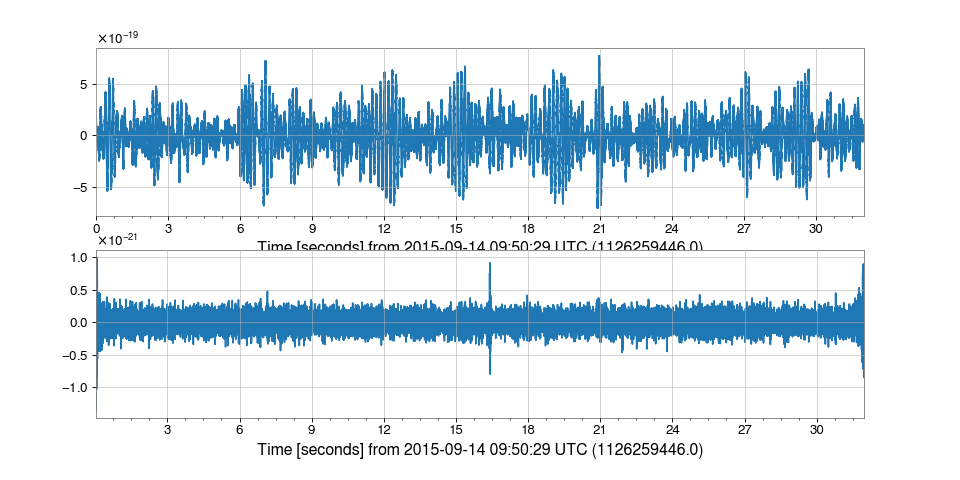
- find_gates(
- tzero: float = 1.0,
- *,
- whiten: bool = True,
- threshold: float = 50.0,
- cluster_window: float = 0.5,
- **whiten_kwargs,
Identify points that should be gates using a provided threshold.
This method identifies points in the
TimeSeriesthat exceed a provided threshold, and returns a list of segments that should be gated. The gating points are clustered within a provided time window.This method is useful for identifying high amplitude peaks in the data that should be removed or masked out.
- Parameters:
- tzero
int, optional Half-width time duration (seconds) in which the timeseries is set to zero.
- whiten
bool, optional If True, data will be whitened before gating points are discovered, use of this option is highly recommended.
- threshold
float, optional Amplitude threshold, if the data exceeds this value a gating window will be placed.
- cluster_window
float, optional Time duration (seconds) over which gating points will be clustered.
- whiten_kwargs
Other keyword arguments will be passed to the
TimeSeries.whitenmethod if it is being used when discovering gating points.
- tzero
- Returns:
- out
SegmentList A list of segments that should be gated based on the provided parameters.
- out
See also
TimeSeries.gateFor a method that applies the identified gates.
- gate(
- tzero: float = 1.0,
- tpad: float = 0.5,
- *,
- whiten: bool = True,
- threshold: float = 50.0,
- cluster_window: float = 0.5,
- **whiten_kwargs,
Remove high amplitude peaks from data using inverse Tukey window.
Points will be discovered automatically using a provided threshold and clustered within a provided time window.
- Parameters:
- tzero
int, optional Half-width time duration (seconds) in which the timeseries is set to zero.
- tpad
int, optional Half-width time duration (seconds) in which the Tukey window is tapered.
- whiten
bool, optional If True, data will be whitened before gating points are discovered, use of this option is highly recommended.
- threshold
float, optional Amplitude threshold, if the data exceeds this value a gating window will be placed.
- cluster_window
float, optional Time duration (seconds) over which gating points will be clustered.
- whiten_kwargs
Other keyword arguments will be passed to the
TimeSeries.whitenmethod if it is being used when discovering gating points.
- tzero
- Returns:
- out
TimeSeries A copy of the original
TimeSeriesthat has had gating windows applied.
- out
See also
TimeSeries.maskFor the method that masks out unwanted data.
TimeSeries.find_gatesFor the method that identifies gating points.
TimeSeries.whitenFor the whitening filter used to identify gating points.
Examples
Read data into a
TimeSeries>>> from gwpy.timeseries import TimeSeries >>> data = TimeSeries.fetch_open_data('H1', 1135148571, 1135148771)
Apply gating using custom arguments
>>> gated = data.gate(
...     tzero=1.0,
...     tpad=1.0,
...     threshold=10.0,
...     fftlength=4,
...     overlap=2,
...     method='median',
... )
Plot the original data and the gated data, whiten both for visualization purposes
>>> overlay = data.whiten(4,2,method="median").plot(
...     dpi=150,
...     label="Ungated",
...     color="dodgerblue",
...     zorder=2,
... )
>>> ax = overlay.gca()
>>> ax.plot(
...     gated.whiten(4, 2, method="median"),
...     label="Gated",
...     color="orange",
...     zorder=3,
... )
>>> ax.set_xlim(1135148661, 1135148681)
>>> ax.legend()
>>> overlay.show()
- heterodyne( ) TimeSeries[source]#
Compute the heterodyned average magnitude and phase of this
TimeSeries.- Parameters:
- phase
array_like An array of phase measurements (radians) with which to heterodyne the signal.
- stride
float, optional Stride (seconds) between calculations.
- singlesided
bool, optional Boolean switch to return single-sided output (i.e., to multiply by 2 so that the signal is distributed across positive frequencies only).
- phase
- Returns:
- out
TimeSeries Magnitude and phase trends, represented as
mag * exp(1j*phase)withdt=stride.
- out
See also
TimeSeries.demodulatefor a method to heterodyne at a fixed frequency
Notes
This is similar to the
demodulate()method, but is more general in that it accepts a varying phase evolution, rather than a fixed frequency.Unlike
demodulate(), the complex output is double-sided by default, so is not multiplied by 2.Examples
Heterodyning can be useful in analysing quasi-monochromatic signals with a known phase evolution, such as continuous-wave signals from rapidly rotating neutron stars. These sources radiate at a frequency that slowly decreases over time, and is Doppler modulated due to the Earth’s rotational and orbital motion.
To see an example of heterodyning in action, we can simulate a signal whose phase evolution is described by the frequency and its first derivative with respect to time. We can download some O1 era LIGO-Livingston data from GWOSC, inject the simulated signal, and recover its amplitude.
>>> from gwpy.timeseries import TimeSeries
>>> data = TimeSeries.fetch_open_data('L1', 1131350417, 1131354017)
We now need to set the signal parameters, generate the expected phase evolution, and create the signal:
>>> import numpy
>>> f0 = 123.456789  # signal frequency (Hz)
>>> fdot = -9.87654321e-7  # signal frequency derivative (Hz/s)
>>> fepoch = 1131350417  # phase epoch
>>> amp = 1.5e-22  # signal amplitude
>>> phase0 = 0.4  # signal phase at the phase epoch
>>> times = data.times.value - fepoch
>>> phase = 2 * numpy.pi * (f0 * times + 0.5 * fdot * times**2)
>>> signal = TimeSeries(amp * numpy.cos(phase + phase0),
>>>                     sample_rate=data.sample_rate, t0=data.t0)
>>> data = data.inject(signal)
To recover the signal, we can bandpass the injected data around the signal frequency, then heterodyne using our phase model with a stride of 60 seconds:
>>> filtdata = data.bandpass(f0 - 0.5, f0 + 0.5)
>>> het = filtdata.heterodyne(phase, stride=60, singlesided=True)
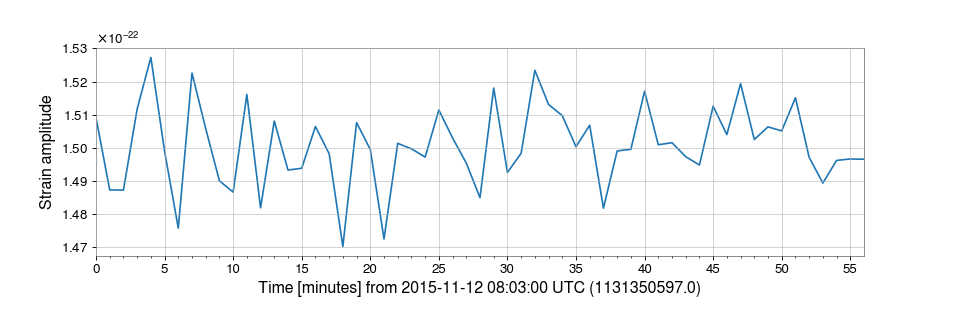
We can then plot signal amplitude over time (cropping the first two minutes to remove the filter response):
>>> plot = het.crop(het.x0.value + 180).abs().plot()
>>> ax = plot.gca()
>>> ax.set_ylabel("Strain amplitude")
>>> plot.show()
(
png)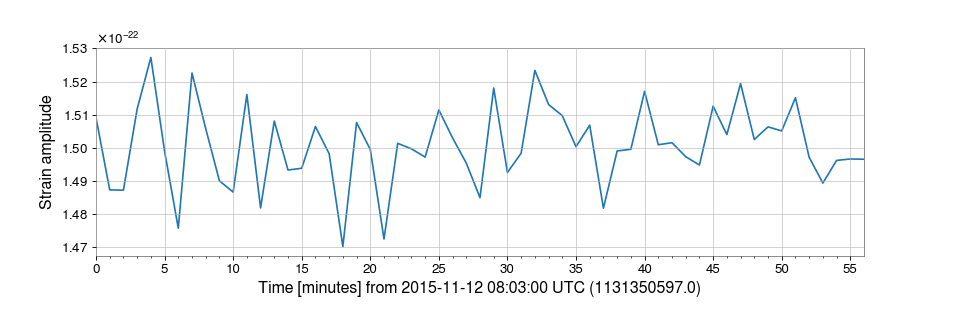
- highpass(
- frequency: float,
- gpass: float = 2,
- gstop: float = 30,
- fstop: float | None = None,
- type: Literal['fir', 'iir'] = 'iir',
- *,
- filtfilt: bool = True,
- **kwargs,
Filter this
TimeSerieswith a high-pass filter.- Parameters:
- frequency
float High-pass corner frequency.
- gpass
float The maximum loss in the passband (dB).
- gstop
float The minimum attenuation in the stopband (dB).
- fstop
float Stop-band edge frequency, defaults to
frequency * 1.5.- type
str The filter type, either
'iir'or'fir'.- filtfilt
bool, optional If
True, apply the filter using a forward-backward filter design, otherwise apply the filter in a single pass. Defaults toTrue.- kwargs
Other keyword arguments are passed to
gwpy.signal.filter_design.highpass().
- frequency
- Returns:
- hpseries
TimeSeries A high-passed version of the input
TimeSeries.
- hpseries
See also
gwpy.signal.filter_design.highpassFor details on the filter design.
TimeSeries.filterFor details on how the filter is applied.
- lowpass(
- frequency: float,
- gpass: float = 2,
- gstop: float = 30,
- fstop: float | None = None,
- type: Literal['fir', 'iir'] = 'iir',
- *,
- filtfilt: bool = True,
- **kwargs,
Filter this
TimeSerieswith a Butterworth low-pass filter.- Parameters:
- frequency
float Low-pass corner frequency.
- gpass
float The maximum loss in the passband (dB).
- gstop
float The minimum attenuation in the stopband (dB).
- fstop
float Stop-band edge frequency, defaults to
frequency * 1.5.- type
str The filter type, either
'iir'or'fir'.- filtfilt
bool, optional If
True, apply the filter using a forward-backward filter design, otherwise apply the filter in a single pass. Defaults toTrue.- kwargs
Other keyword arguments are passed to
gwpy.signal.filter_design.lowpass().
- frequency
- Returns:
- lpseries
TimeSeries A low-passed version of the input
TimeSeries.
- lpseries
See also
gwpy.signal.filter_design.lowpassFor details on the filter design.
TimeSeries.filterFor details on how the filter is applied.
- mask(
- deadtime: SegmentList | None = None,
- flag: str | None = None,
- *,
- query_open_data: bool = False,
- const: float = nan,
- tpad: float = 0.5,
- inplace: bool = False,
- **kwargs,
Mask portions of this
TimeSeriesthat fall within a given list of segments.- Parameters:
- deadtime
SegmentList, optional A list of time segments defining the deadtime (i.e., masked portions) of the output, will supersede
flagif given.- flag
str, optional The name of a data-quality flag for which to query, required if
deadtimeis not given.- query_open_data
bool, optional If
True, will query for publicly released data-quality segments through the Gravitational-wave Open Science Center (GWOSC).- const
float, optional Constant value with which to mask deadtime data.
- tpad
float, optional Length of time (in seconds) over which to taper off data at mask segment boundaries.
- inplace
bool, optional If
True, this array will be overwritten with the masked version, otherwise (False, default) a modified copy will be returned.- kwargs
dict, optional Additional keyword arguments to
queryorfetch_open_data, see “Notes” below.
- deadtime
- Returns:
- out
TimeSeries The masked version of this
TimeSeries.
- out
See also
gwpy.segments.DataQualityFlag.queryFor the method to query segments of a given data-quality flag.
gwpy.segments.DataQualityFlag.fetch_open_dataFor the method to query data-quality flags from the GWOSC database.
scipy.signal.windows.tukeyFor the Tukey (tapered cosine) window used for tapering.
Notes
If
tpadis nonzero, the Tukey (tapered cosine) window is used to smoothly ramp data down to zero over a timescaletpadapproaching every segment boundary indeadtime. However, this does not apply to the left or right bounds of the originalTimeSeries.The
deadtimesegment list will always be coalesced and restricted to the limits ofself.span. In particular, when querying a data-quality flag, this means thestartandendarguments toquerywill effectively be reset and therefore need not be given.If
flagis interpreted positively, i.e. ifflagbeing active corresponds to a “good” state, then its complement inself.spanwill be used to define the deadtime for masking.
- notch(
- frequency: QuantityLike,
- type: Literal['iir'] = 'iir',
- *,
- filtfilt: bool = True,
- **kwargs,
Notch out a frequency in this
TimeSeries.- Parameters:
- frequency
float,Quantity Frequency (default in Hertz) at which to apply the notch.
- type
str, optional Type of filter to apply, currently only ‘iir’ is supported.
- filtfilt
bool, optional Whether to apply zero-phase filtering (default is True).
- kwargs
Other keyword arguments to pass to
gwpy.signal.filter_design.notch.
- frequency
- Returns:
- notched
TimeSeries A notch-filtered copy of the input
TimeSeries.
- notched
See also
TimeSeries.filterFor details on the filtering method.
gwpy.signal.filter_design.notchFor details on the IIR filter design method.
- psd(
- fftlength: float | None = None,
- overlap: float | None = None,
- window: WindowLike = 'hann',
- method: str = 'median',
- **kwargs,
Calculate the PSD
FrequencySeriesfor thisTimeSeries.- Parameters:
- fftlength
float Number of seconds in single FFT, defaults to a single FFT covering the full duration.
- overlap
float, optional Number of seconds of overlap between FFTs, defaults to the recommended overlap for the given window (if given), or 0.
- window
str,numpy.ndarray, optional Window function to apply to timeseries prior to FFT, see
scipy.signal.get_window()for details on acceptable formats.- method
str, optional FFT-averaging method (default:
'median'), see Notes for more details.- kwargs
Other keyword arguments are passed to the underlying PSD-generation method.
- fftlength
- Returns:
- psd
FrequencySeries A data series containing the PSD.
- psd
Notes
The accepted
methodarguments are:'bartlett': a mean average of non-overlapping periodograms'median': a median average of overlapping periodograms'welch': a mean average of overlapping periodograms
- q_gram(
- qrange: tuple[float, float] = (4, 64),
- frange: tuple[float, float] = (0, inf),
- mismatch: float = 0.2,
- snrthresh: float = 5.5,
- **kwargs,
Scan a
TimeSeriesusing the multi-Q transform.- Parameters:
- qrange
tupleoffloat, optional (low, high)range of Qs to scan.- frange
tupleoffloat, optional (low, high)range of frequencies to scan.- mismatch
float, optional Maximum allowed fractional mismatch between neighbouring tiles.
- snrthresh
float, optional Lower inclusive threshold on individual tile SNR to keep in the table.
- kwargs
Other keyword arguments to be passed to
QTiling.transform(), including'epoch'and'search'.
- qrange
- Returns:
- qgram
EventTable A table of time-frequency tiles on the most significant
QPlane.
- qgram
See also
TimeSeries.q_transformFor a method to interpolate the raw Q-transform over a regularly gridded spectrogram.
gwpy.signal.qtransformFor code and documentation on how the Q-transform is implemented.
gwpy.table.EventTable.tileTo render this
EventTableas a collection of polygons.
Notes
Only tiles with signal energy greater than or equal to
snrthresh ** 2 / 2will be stored in the outputEventTable. The table columns are'time','duration','frequency','bandwidth', and'energy'.
- q_transform(
- qrange: tuple[float, float] = (4, 64),
- frange: tuple[float, float] = (0, inf),
- gps: float | None = None,
- search: float = 0.5,
- tres: str | float = '<default>',
- fres: str | float = '<default>',
- *,
- logf: bool = False,
- norm: str = 'median',
- mismatch: float = 0.2,
- outseg: Segment | None = None,
- whiten: bool | FrequencySeries = True,
- fduration: float = 2,
- highpass: float | None = None,
- **asd_kw,
Compute the multi-Q transform and return an interpolated spectrogram.
By default, this method returns a high-resolution spectrogram in both time and frequency, which can result in a large memory footprint. If you know that you only need a subset of the output for, say, a figure, consider using
outsegand the other keyword arguments to restrict the size of the returned data.- Parameters:
- qrange
tupleoffloat, optional (low, high)range of Qs to scan.- frange
tupleoffloat, optional (log, high)range of frequencies to scan.- gps
float, optional Central time of interest for determine loudest Q-plane.
- search
float, optional Window around
gpsin which to find peak energies, only used ifgpsis given.- tres
float, optional Desired time resolution (seconds) of output
Spectrogram, default isabs(outseg) / 1000.- fres
float,int,None, optional Desired frequency resolution (Hertz) of output
Spectrogram, or, iflogf=True, the number of frequency samples; giveNoneto skip this step and return the original resolution, default is 0.5 Hz or 500 frequency samples.- logf
bool, optional If
True, use logarithmically sampled frequencies in the output (usingfresas the number of frequency samples), otherwise use linearly sampled frequencies of the specified resolution.- norm
bool,str, optional If
Truenormalise the returned Q-transform output by the median; ifFalsedo not normalize; if a string, specify how to normalize the output, e.g.'mean'or'median'.- mismatch
float Maximum allowed fractional mismatch between neighbouring tiles.
- outseg
Segment, optional GPS
[start, stop)segment for outputSpectrogram, default is the full duration of the input.- whiten
bool,FrequencySeries, optional If
True, whiten the data before computing the Q-transform; ifFalse, do not whiten the data; if aFrequencySeries, use that as the amplitude spectral density (ASD) to whiten the data.- fduration
float, optional Duration (in seconds) of the time-domain FIR whitening filter, only used if
whitenis notFalse, defaults to 2 seconds.- highpass
float, optional Highpass corner frequency (in Hz) of the FIR whitening filter, used only if
whitenis notFalse, default:None.- asd_kw
Keyword arguments to pass to
TimeSeries.asdto generate an ASD to use when whitening the data.
- qrange
- Returns:
- out
Spectrogram Output
Spectrogramof normalised Q energy.
- out
See also
TimeSeries.asdFor documentation on acceptable
**asd_kw.TimeSeries.whitenFor documentation on how the whitening is done.
gwpy.signal.qtransformFor code and documentation on how the Q-transform is implemented.
Notes
This method will return a
Spectrogramof dtypefloat32ifnormis given, andfloat64otherwise.To optimize plot rendering with
pcolormesh, the outputSpectrogramcan be given a log-sampled frequency axis by passinglogf=Trueat runtime. Thefresargument is then the number of points on the frequency axis. Note, this is incompatible withimshow.It is also highly recommended to use the
outsegkeyword argument when only a small window around a given GPS time is of interest. This will speed up this method a little, but can greatly speed up rendering the resultingSpectrogramusingpcolormesh.If you aren’t going to use
pcolormeshin the end, don’t worry.Examples
>>> from numpy.random import normal
>>> from scipy.signal import gausspulse
>>> from gwpy.timeseries import TimeSeries
Generate a
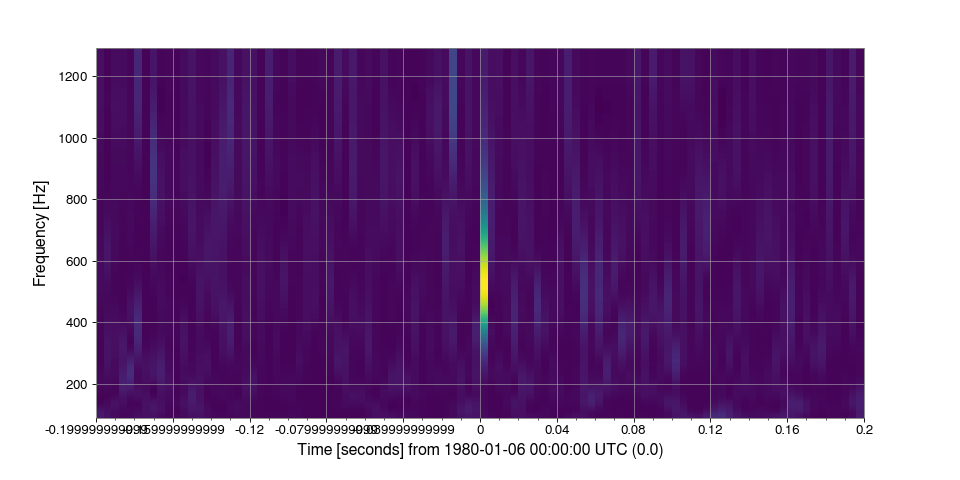
TimeSeriescontaining Gaussian noise sampled at 4096 Hz, centred on GPS time 0, with a sine-Gaussian pulse (‘glitch’) at 500 Hz:>>> noise = TimeSeries( ... normal(loc=1, size=4096*4), ... sample_rate=4096, ... epoch=-2, ... ) >>> glitch = TimeSeries( ... gausspulse(noise.times.value, fc=500) * 4, ... sample_rate=4096, ... ) >>> data = noise + glitch
Compute and plot the Q-transform of these data:
>>> q = data.q_transform()
>>> plot = q.plot()
>>> ax = plot.gca()
>>> ax.set_xlim(-.2, .2)
>>> ax.set_epoch(0)
>>> plot.show()
(
png)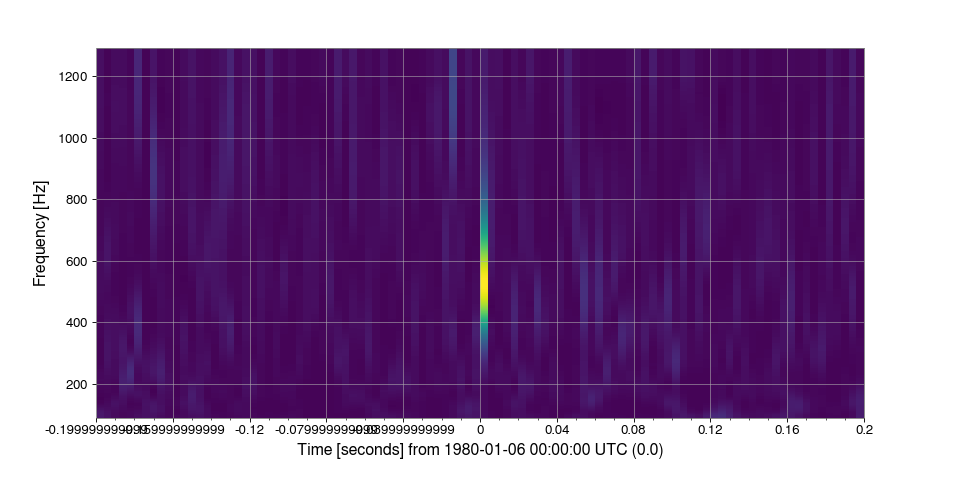
- rayleigh_spectrogram(
- stride: float,
- fftlength: float | None = None,
- overlap: float = 0,
- window: WindowLike = 'hann',
- nproc: int = 1,
- **kwargs,
Calculate the Rayleigh statistic spectrogram of this
TimeSeries.- Parameters:
- stride
float Number of seconds in single PSD (column of spectrogram).
- fftlength
float Number of seconds in single FFT.
- overlap
float, optional Number of seconds of overlap between FFTs, passing
Nonewill choose based on the window method, default:0.- window
str,numpy.ndarray, optional Window function to apply to timeseries prior to FFT, see
scipy.signal.get_window()for details on acceptable formats.- nproc
int, optional Maximum number of independent frame reading processes, default is set to single-process file reading.
- kwargs
Other keyword arguments are passed to the underlying Rayleigh statistic calculation.
- stride
- Returns:
- spectrogram
Spectrogram Time-frequency Rayleigh spectrogram as generated from the input time-series.
- spectrogram
See also
TimeSeries.rayleighFor details of the statistic calculation.
- rayleigh_spectrum( ) FrequencySeries[source]#
Calculate the Rayleigh
FrequencySeriesfor thisTimeSeries.The Rayleigh statistic is calculated as the ratio of the standard deviation and the mean of a number of periodograms.
- Parameters:
- fftlength
float Number of seconds in single FFT, defaults to a single FFT covering the full duration.
- overlap
float, optional Number of seconds of overlap between FFTs, passing
Nonewill choose based on the window method, default:0.- window
str,numpy.ndarray, optional Window function to apply to timeseries prior to FFT, see
scipy.signal.get_window()for details on acceptable formats.
- fftlength
- Returns:
- psd
FrequencySeries A data series containing the PSD.
- psd
- resample(
- rate: float,
- window: WindowLike = 'hamming',
- ftype: Literal['fir', 'iir'] = 'fir',
- n: int | None = None,
Resample this Series to a new rate.
Upsampling, or downsampling by a non-integer factor calls out to
scipy.signal.resample(), while integer downsampling calls out toscipy.signal.decimate().- Parameters:
- rate
float,astropy.units.Quantity Rate to which to resample this
Series.- window
str,numpy.ndarray, optional Window function to apply to signal in the Fourier domain, see
scipy.signal.get_window()for details on acceptable formats, only used forftype='fir'or irregular downsampling.- ftype
str, optional Type of filter, either ‘fir’ or ‘iir’, defaults to ‘fir’.
- n
int, optional If
ftype='fir'the number of taps in the filter, otherwise the order of the Chebyshev type I IIR filter.
- rate
- Returns:
SeriesA new Series with the resampling applied, and the same metadata.
- rms(stride: float = 1) TimeSeries[source]#
Calculate the root-mean-square value of this
TimeSeriesonce per stride.- Parameters:
- stride
float stride (seconds) between RMS calculations
- stride
- Returns:
- rms
TimeSeries a new
TimeSeriescontaining the RMS value with dt=stride
- rms
- spectral_variance(
- stride: float,
- fftlength: float | None = None,
- overlap: float | None = None,
- method: str = 'median',
- window: WindowLike = 'hann',
- *,
- nproc: int = 1,
- filter_: FilterCompatible | None = None,
- bins: ArrayLike | None = None,
- low: float | None = None,
- high: float | None = None,
- nbins: int = 500,
- log: bool = False,
- norm: bool = False,
- density: bool = False,
Calculate the
SpectralVarianceof thisTimeSeries.- Parameters:
- stride
float Number of seconds in single PSD (column of spectrogram).
- fftlength
float Number of seconds in single FFT.
- method
str, optional FFT-averaging method (default:
'median'), see Notes for more details.- overlap
float, optional Number of seconds of overlap between FFTs, defaults to the recommended overlap for the given window (if given), or 0.
- window
str,numpy.ndarray, optional Window function to apply to timeseries prior to FFT, see
scipy.signal.get_window()for details on acceptable formats.- nproc
int Maximum number of independent frame reading processes, default is set to single-process file reading.
- filter_
FilterCompatible, optional Filter to apply to each time-bin of the spectrogram prior to variance calculation.
- bins
numpy.ndarray, optional,defaultNone Array of histogram bin edges, including the rightmost edge.
- low
float, optional Left edge of lowest amplitude bin, only read if
binsis not given.- high
float, optional Right edge of highest amplitude bin, only read if
binsis not given.- nbins
int, optional Number of bins to generate, only read if
binsis not given.- log
bool, optional Calculate amplitude bins over a logarithmic scale, only read if
binsis not given.- norm
bool, optional Normalise bin counts to a unit sum.
- density
bool, optional Normalise bin counts to a unit integral.
- stride
- Returns:
- specvar
SpectralVariance 2D-array of spectral frequency-amplitude counts.
- specvar
See also
numpy.histogramFor details on specifying bins and weights.
Notes
The accepted
methodarguments are:'bartlett': a mean average of non-overlapping periodograms'median': a median average of overlapping periodograms'welch': a mean average of overlapping periodograms
- spectrogram(
- stride: float,
- fftlength: float | None = None,
- overlap: float | None = None,
- window: WindowLike = 'hann',
- method: str = 'median',
- nproc: int = 1,
- **kwargs,
Calculate the average power spectrogram of this
TimeSeries.Each time-bin of the output
Spectrogramis calculated by taking a chunk of theTimeSeriesin the segment[t - overlap/2., t + stride + overlap/2.)and calculating thepsd()of those data.As a result, each time-bin is calculated using
stride + overlapseconds of data.- Parameters:
- stride
float Number of seconds in single PSD (column of spectrogram).
- fftlength
float Number of seconds in single FFT.
- overlap
float, optional Number of seconds of overlap between FFTs, defaults to the recommended overlap for the given window (if given), or 0.
- window
str,numpy.ndarray, optional Window function to apply to timeseries prior to FFT, see
scipy.signal.get_window()for details on acceptable formats.- method
str, optional FFT-averaging method (default:
'median'), see Notes for more details.- nproc
int Number of CPUs to use in parallel processing of FFTs.
- kwargs
Other keyword arguments are passed to the underlying PSD-generation method.
- stride
- Returns:
- spectrogram
Spectrogram Time-frequency power spectrogram as generated from the input time-series.
- spectrogram
Notes
The accepted
methodarguments are:'bartlett': a mean average of non-overlapping periodograms'median': a median average of overlapping periodograms'welch': a mean average of overlapping periodograms
- spectrogram2( ) Spectrogram[source]#
Calculate the non-averaged power
Spectrogramof thisTimeSeries.- Parameters:
- fftlength
float Number of seconds in single FFT.
- overlap
float, optional Number of seconds of overlap between FFTs, defaults to the recommended overlap for the given window (if given), or 0
- window
str,numpy.ndarray, optional Window function to apply to timeseries prior to FFT, see
scipy.signal.get_window()for details on acceptable formats.- scaling[ ‘density’ | ‘spectrum’ ], optional
Selects between computing the power spectral density (‘density’) where the
Spectrogramhas units of V**2/Hz if the input is measured in V and computing the power spectrum (‘spectrum’) where theSpectrogramhas units of V**2 if the input is measured in V. Defaults to ‘density’.- kwargs
Other parameters to be passed to
scipy.signal.periodogramfor each column of theSpectrogram.
- fftlength
- Returns:
- spectrogram:
Spectrogram A power
Spectrogramwith1/fftlengthfrequency resolution and (fftlength - overlap) time resolution.
- spectrogram:
See also
scipy.signal.periodogramFor documentation on the Fourier methods used in this calculation.
Notes
This method calculates overlapping periodograms for all possible chunks of data entirely containing within the span of the input
TimeSeries, then normalises the power in overlapping chunks using a triangular window centred on that chunk which most overlaps the givenSpectrogramtime sample.
- taper(
- side: Literal['left', 'right', 'leftright'] = 'leftright',
- duration: float | None = None,
- nsamples: int | None = None,
Taper the ends of this
TimeSeriessmoothly to zero.- Parameters:
- side
str, optional The side of the
TimeSeriesto taper, must be one of'left','right', or'leftright'.- duration
float, optional The duration of time to taper, will override
nsamplesif both are provided as arguments.- nsamples
int, optional The number of samples to taper, will be overridden by
durationif both are provided as arguments.
- side
- Returns:
- out
TimeSeries A copy of
selftapered at one or both ends.
- out
- Raises:
ValueErrorIf
sideis not one of('left', 'right', 'leftright').
Notes
The
TimeSeries.taper()automatically tapers from the second stationary point (local maximum or minimum) on the specified side of the input. However, the method will never taper more than half the full width of theTimeSeries, and will fail if there are no stationary points.See
scipy.signal.windows.tukey()for the Tukey (tapered cosine) window used for tapering, and seescipy.signal.get_window()for other common window formats.Examples
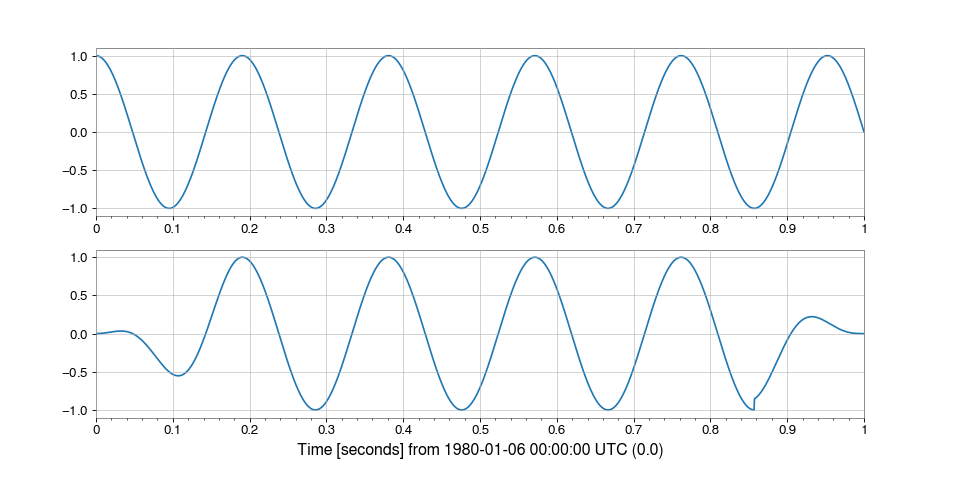
To see the effect of the Tukey (tapered cosine) window, we can taper a sinusoidal
TimeSeriesat both ends:>>> import numpy >>> from gwpy.timeseries import TimeSeries >>> t = numpy.linspace(0, 1, 2048) >>> series = TimeSeries(numpy.cos(10.5*numpy.pi*t), times=t) >>> tapered = series.taper()
We can plot it to see how the ends now vary smoothly from 0 to 1:
>>> from gwpy.plot import Plot
>>> plot = Plot(series, tapered, separate=True, sharex=True)
>>> plot.show()
(
png)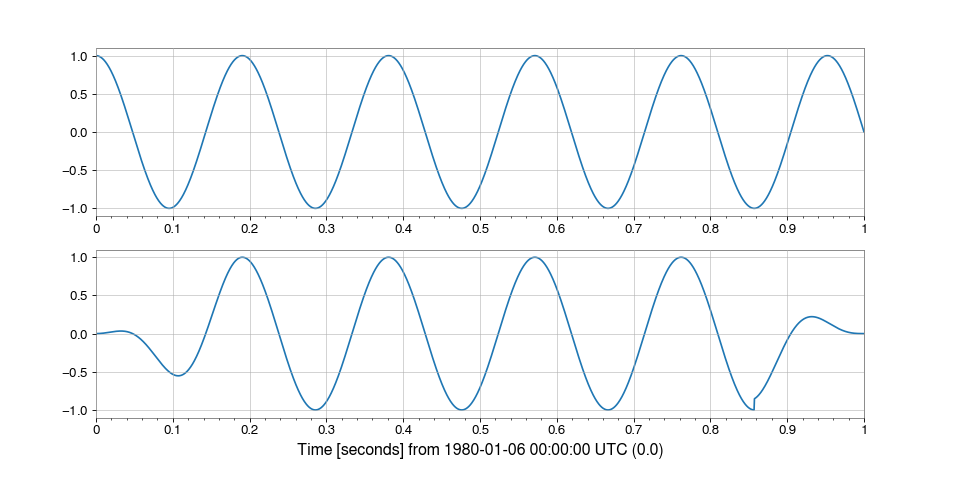
- transfer_function(
- other: TimeSeries,
- fftlength: float | None = None,
- overlap: float | None = None,
- window: WindowLike = 'hann',
- average: str = 'mean',
- **kwargs,
Calculate the transfer function between this
TimeSeriesand another.This
TimeSeriesis the ‘A-channel’, serving as the reference (denominator) while the other time series is the test (numerator)- Parameters:
- other
TimeSeries TimeSeriessignal to calculate the transfer function with.- fftlength
float, optional Number of seconds in single FFT, defaults to a single FFT covering the full duration.
- overlap
float, optional Number of seconds of overlap between FFTs, defaults to the recommended overlap for the given window (if given), or 0.
- window
str,numpy.ndarray, optional Window function to apply to timeseries prior to FFT, see
scipy.signal.get_window()for details on acceptable formats.- average
str, optional FFT-averaging method (default:
'mean') passed to underlying csd() and psd() methods.- kwargs
Any other keyword arguments accepted by
TimeSeries.csd()orTimeSeries.psd().
- other
- Returns:
- transfer_function
FrequencySeries The transfer function
FrequencySeriesof thisTimeSerieswith the other.
- transfer_function
Notes
If
selfandotherhave differenceTimeSeries.sample_ratevalues, the higher sampledTimeSerieswill be down-sampled to match the lower.
- whiten(
- fftlength: float | None = None,
- overlap: float = 0,
- method: str = 'median',
- window: WindowLike = 'hann',
- detrend: Literal['linear', 'constant'] = 'constant',
- asd: FrequencySeries | None = None,
- fduration: float = 2,
- highpass: float | None = None,
- **kwargs,
Whiten this
TimeSeriesusing inverse spectrum truncation.- Parameters:
- fftlength
float, optional FFT integration length (in seconds) for ASD estimation.
- overlap
float, optional Number of seconds of overlap between FFTs, defaults to the recommended overlap for the given window (if given), or 0.
- method
str, optional FFT-averaging method (default:
'median').- window
str,numpy.ndarray, optional Window function to apply to timeseries prior to FFT, see
scipy.signal.get_window()for details on acceptable formats.- detrend
str, optional Type of detrending to do before FFT (see
detrendfor more details).- asd
FrequencySeries, optional The amplitude spectral density using which to whiten the data, overrides other ASD arguments, default:
None.- fduration
float, optional Duration (in seconds) of the time-domain FIR whitening filter, must be no longer than
fftlength, default: 2 seconds.- highpass
float, optional Highpass corner frequency (in Hz) of the FIR whitening filter.
- kwargs
Other keyword arguments are passed to the
TimeSeries.asdmethod to estimate the amplitude spectral densityFrequencySeriesof thisTimeSeries.
- fftlength
- Returns:
- out
TimeSeries A whitened version of the input data with zero mean and unit variance.
- out
See also
TimeSeries.asdFor details on the ASD calculation.
TimeSeries.convolveFor details on convolution with the overlap-save method.
gwpy.signal.filter_design.fir_from_transferFor FIR filter design through spectrum truncation.
Notes
The accepted
methodarguments are:'bartlett': a mean average of non-overlapping periodograms'median': a median average of overlapping periodograms'welch': a mean average of overlapping periodograms
The
windowargument is used in ASD estimation, FIR filter design, and in preventing spectral leakage in the output.Due to filter settle-in, a segment of length
0.5*fdurationwill be corrupted at the beginning and end of the output. Seeconvolvefor more details.The input is detrended and the output normalised such that, if the input is stationary and Gaussian, then the output will have zero mean and unit variance.
For more on inverse spectrum truncation, see arXiv:gr-qc/0509116.
- zpk(
- zeros: ArrayLike1D,
- poles: ArrayLike1D,
- gain: float,
- *,
- analog: bool = False,
- unit: str = 'rad/s',
- normalize_gain: bool = False,
- filtfilt: bool = True,
- **kwargs,
Filter this
TimeSeriesby applying a digital zero-pole-gain filter.- Parameters:
- zeros
array-like Zeros of the transfer function.
- poles
array-like Poles of the transfer function.
- gain
float System gain.
- analog
bool, optional Type of filter being applied. If
analog=Truethe zeros/poles/gain will be transformed from analogue (s-plane) to digital (z-plane) representation using the bilinear transform.- unit
str For analogue ZPK filters, the units in which the zeros and poles are specified. Either
'Hz'or'rad/s'(default).- normalize_gain
bool, optional Whether to normalize the gain when converting from Hz to rad/s.
False(default): Multiply zeros/poles by -2π but leave gain unchanged. This matches the LIGO GDS ‘f’ plane convention (plane='f'ins2z()).True: Normalize gain to preserve frequency response magnitude. Gain is scaled by \(|∏p_i/∏z_i| · (2π)^{(n_p - n_z)}\). Use this when your filter was designed with the transfer function \(H(f) = k·∏(f-z_i)/∏(f-p_i)\) in Hz. This matches the LIGO GDS ‘n’ plane convention (plane='n'ins2z()).
Only used for analogue filters in Hz (
analog=True, unit="Hz").- filtfilt
bool, optional If
True(default), apply the filter using a forward-backward filter design, otherwise apply the filter in a single pass.- kwargs
Other keyword arguments are passed to the filter method.
- zeros
- Returns:
- timeseries
TimeSeries The filtered version of the input data.
- timeseries
See also
TimeSeries.filterFor details on how a digital ZPK-format filter is applied.
gwpy.signal.filter_design.prepare_digital_filterFor details on preparing the digital ZPK filter for application.
Examples
To apply a zpk filter with file poles at 100 Hz, and five zeros at 1 Hz (giving an overall DC gain of 1e-10):
>>> data2 = data.zpk([100]*5, [1]*5, 1e-10)